# Como assinar um documento?

Para assinar um documento PDF, basta seguir os seguintes passos:

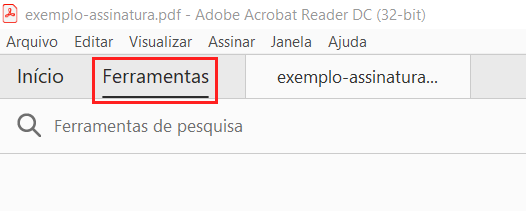
a) Com o documento a ser assinado aberto, clique em **Ferramentas**
![image-1624629119549.png](https://lh7-rt.googleusercontent.com/docsz/AD_4nXc2MYfXKaKlzWC7VJaZrz73wbl3sDt22JkDKy1tlT5I2TiPp14itp2OKfjSFdDWvLukXFeoJ0KynHqJf7VqgH93fiHngvqiLCrPh5u7zo1B7NtiWsrBYu6AqTP5CrLGPYjVDZWwTM6pe7lKUZDrCl7S0J-h?key=LYI8w5RrNytoasnX21-Wuov1)

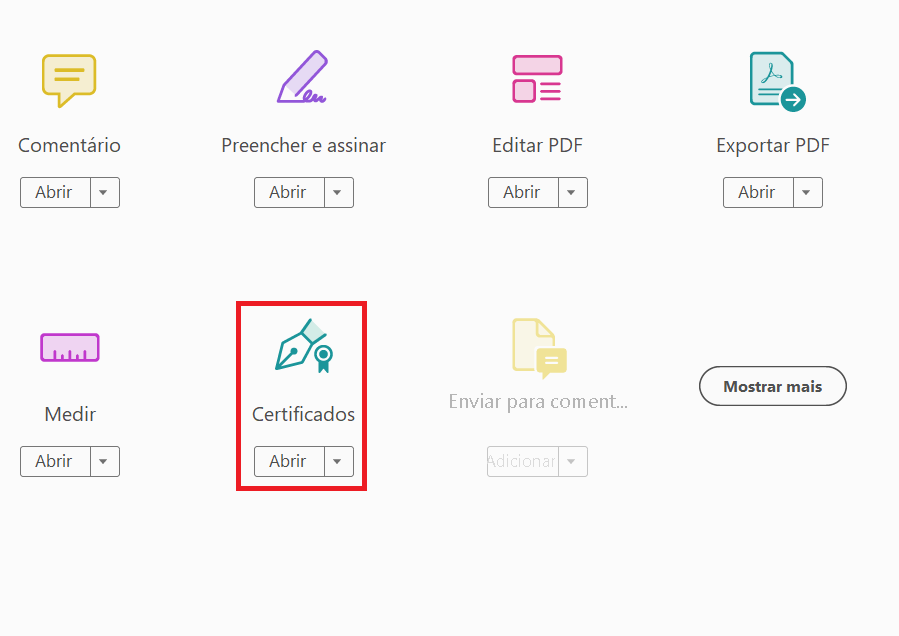
b) Clique em **Certificados**

![image-1624630804775.png](https://lh7-rt.googleusercontent.com/docsz/AD_4nXf3EZxJupbB37k_I-yXNE3-rU8HGR2jqwVUHz7UQz80l-X2d9SzruuL2RRQT_mVrU1hXtGR8oLl3Lh_ca_hGvJu7VPTSxWq0OUftBiZzHLvo4Osz0BTj_f8SjBkLv4H5slnK9MHs50f5QgzotdvAcIa_5_M?key=LYI8w5RrNytoasnX21-Wuov1)

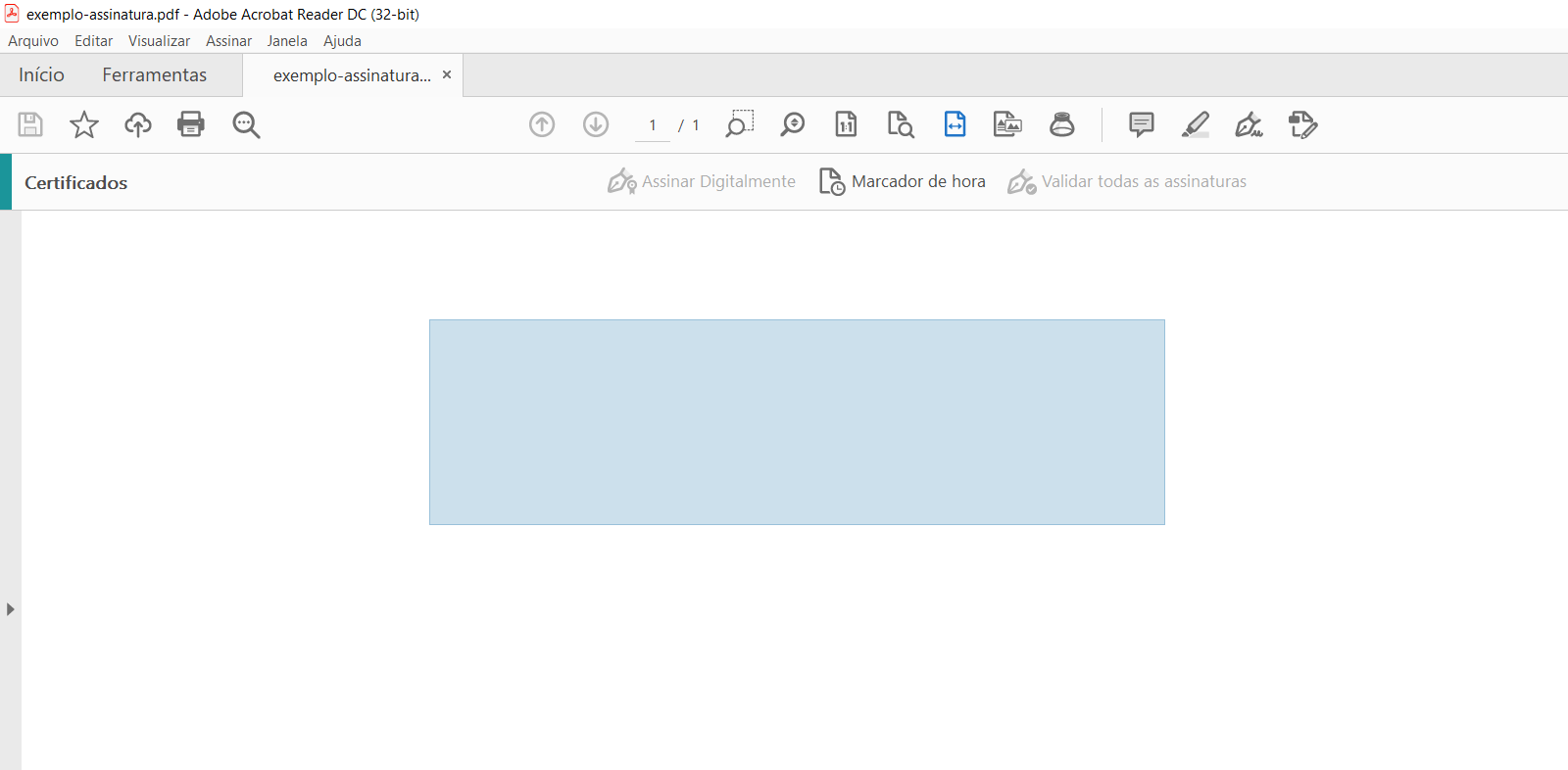
<span style="font-family: Roboto, sans-serif; color: #222222; background-color: transparent; font-weight: 400; font-style: normal; font-variant: normal; vertical-align: baseline; white-space: pre-wrap;">c) Clique em </span><span style="font-family: Roboto, sans-serif; color: #222222; background-color: transparent; font-weight: bold; font-style: normal; font-variant: normal; vertical-align: baseline; white-space: pre-wrap;">Assinar Digitalmente</span>

![image-1624630849077.png](https://lh7-rt.googleusercontent.com/docsz/AD_4nXdjeyX9QHHsONF5NhnismCmkRP9vU8RiconT5HNAZzRyaU_36gCCG_FE07s-fl7Oc4hskqK3WoXC0ZQ-bPdM1BiNIOWQeJHc_5pDVTZs3uXO0RQG1nWpl199UPXF-lLkCrdLKSKDLhMrdv6F0-nad75BiyQ?key=LYI8w5RrNytoasnX21-Wuov1)

<span style="font-family: Roboto, sans-serif; color: #222222; background-color: transparent; font-weight: 400; font-style: normal; font-variant: normal; text-decoration: none; vertical-align: baseline; white-space: pre-wrap;">d) O Adobe Acrobat Reader solicitará que o usuário use o mouse para delimitar a área na qual a assinatura deverá ser exibida. Clique em </span><span style="font-family: Roboto, sans-serif; color: #222222; background-color: transparent; font-weight: bold; font-style: normal; font-variant: normal; text-decoration: none; vertical-align: baseline; white-space: pre-wrap;">OK</span><span style="font-family: Roboto, sans-serif; color: #222222; background-color: transparent; font-weight: 400; font-style: normal; font-variant: normal; text-decoration: none; vertical-align: baseline; white-space: pre-wrap;"> e, em seguida, clique e arraste com o mouse na área desejada</span>

![image-1624630893088.png](https://lh7-rt.googleusercontent.com/docsz/AD_4nXeudQDSOPBg3DBrRX6gyQbQ_lN25dcRMA7Z3ibPM46bZY9Y7nf2SrvusLcEND9KBM9uQKet331yhqpSCeiv-bKJOpqrf6LeGIyEQTCorcEFR5UYzE8nkIGRbW0KVFgUt5bIdY7ar5VTZuX44gFVVzq64zZA?key=LYI8w5RrNytoasnX21-Wuov1)<span style="font-family: Roboto, sans-serif; color: #222222; background-color: transparent; font-weight: 400; font-style: normal; font-variant: normal; text-decoration: none; vertical-align: baseline; white-space: pre-wrap;">  
</span>

![](https://lh7-rt.googleusercontent.com/docsz/AD_4nXfySUqnI18x1kFWaCQ6o95giCLpr_B-0MgKqTOw4yHluyN2RgbH94A2Te_Bq6jT9_L2ni-RPdaomSViuSczOV0yhV73KyULE4xDEbExHfQthdUULML0QnnWDw48JoMr1K_f5K8sCpFvV3sfk3-ROs7j9R0?key=LYI8w5RrNytoasnX21-Wuov1)

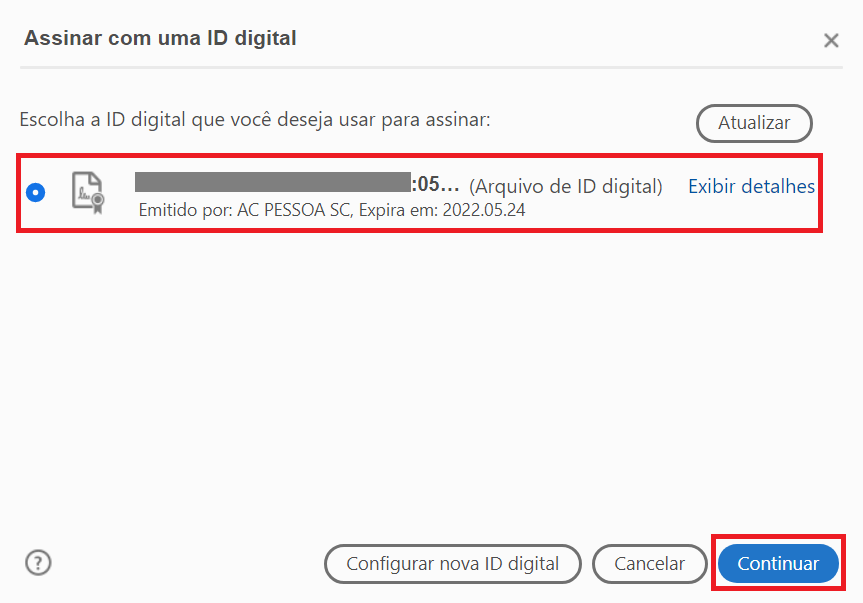
<span style="font-family: Roboto, sans-serif; color: #222222; background-color: transparent; font-weight: 400; font-style: normal; font-variant: normal; text-decoration: none; vertical-align: baseline; white-space: pre-wrap;">e) Selecionar a assinatura digital e clique em </span><span style="font-family: Roboto, sans-serif; color: #222222; background-color: transparent; font-weight: bold; font-style: normal; font-variant: normal; text-decoration: none; vertical-align: baseline; white-space: pre-wrap;">Continuar</span>

![image-1624632227636.png](https://lh7-rt.googleusercontent.com/docsz/AD_4nXfSIxxqyo2qnb6M0Mhc2LUTzXdyHhAQt5uOU6qriv7pxuEthuQSe4h2hsExbGlf_QdtelRJy5IRFMQBxLW9RIMtlvIFOTPE8Km3xVxCUKWTP3BYAsw4JnStGdP-Jc1EM4rEvj0G7CR3D0DW3rkNR62Yz_c1?key=LYI8w5RrNytoasnX21-Wuov1)

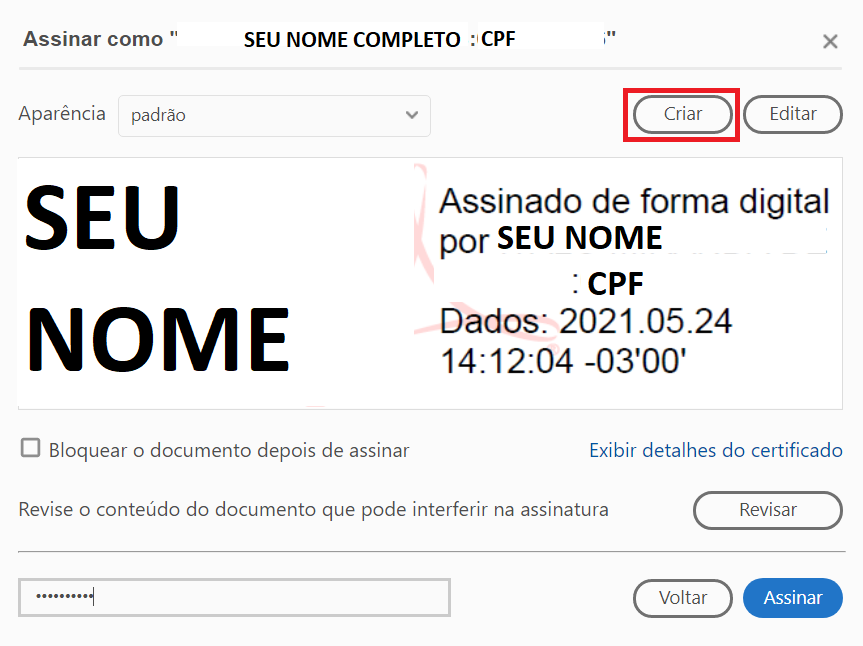
<span style="font-family: Roboto, sans-serif; color: #222222; background-color: transparent; font-weight: 400; font-style: normal; font-variant: normal; text-decoration: none; vertical-align: baseline; white-space: pre-wrap;">f) Caso deseje modificar a aparência da assinatura, clique em </span><span style="font-family: Roboto, sans-serif; color: #222222; background-color: transparent; font-weight: bold; font-style: normal; font-variant: normal; text-decoration: none; vertical-align: baseline; white-space: pre-wrap;">Criar</span><span style="font-family: Roboto, sans-serif; color: #222222; background-color: transparent; font-weight: 400; font-style: normal; font-variant: normal; text-decoration: none; vertical-align: baseline; white-space: pre-wrap;">.</span>

![image-1624632278978.png](https://lh7-rt.googleusercontent.com/docsz/AD_4nXdWcG1_lyLZevPeWGeHutZS5UsxI_WrQiT7UvasIeDyc-ILBJ4hw5Ijf55olITyTUYAxo8sqXNypq-rNU_pFu4zF9ZOtDzqc9DakOUW0nhb3DduI9frAtjF8y5-R84jBluL2VteRf6P_BJC7o1JPN1Y2THq?key=LYI8w5RrNytoasnX21-Wuov1)

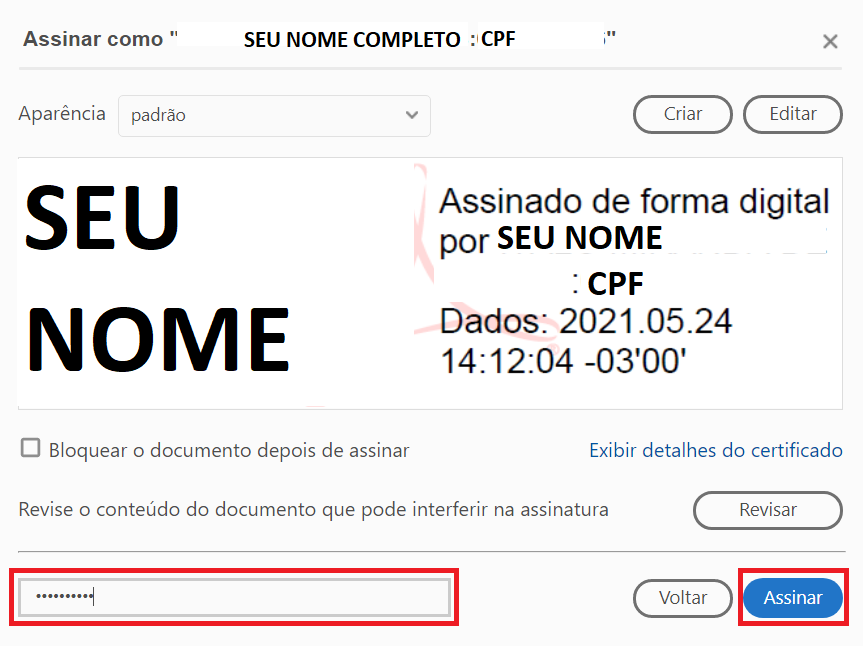
<span style="font-family: Roboto, sans-serif; color: #222222; background-color: transparent; font-weight: 400; font-style: normal; font-variant: normal; text-decoration: none; vertical-align: baseline; white-space: pre-wrap;">g) Insira a senha criada para o certificado digital e depois clique em </span><span style="font-family: Roboto, sans-serif; color: #222222; background-color: transparent; font-weight: bold; font-style: normal; font-variant: normal; text-decoration: none; vertical-align: baseline; white-space: pre-wrap;">Assinar</span>

![image-1624632326521.png](https://lh7-rt.googleusercontent.com/docsz/AD_4nXflhg3IQaOznlllDiKIfcBt2Vxm49B7LkD5ZOA5aX12zk1q4B4nmQbxgpO9Bxca_RAXM9Yzm12vA3Bsv8Bjyj6SMoLc-ylyfO-zC3jil4sHaGOlbi_KpGOcRvP_qUd1i44ToIXxv_UFKSYrdoQnF4bHMa5o?key=LYI8w5RrNytoasnX21-Wuov1)

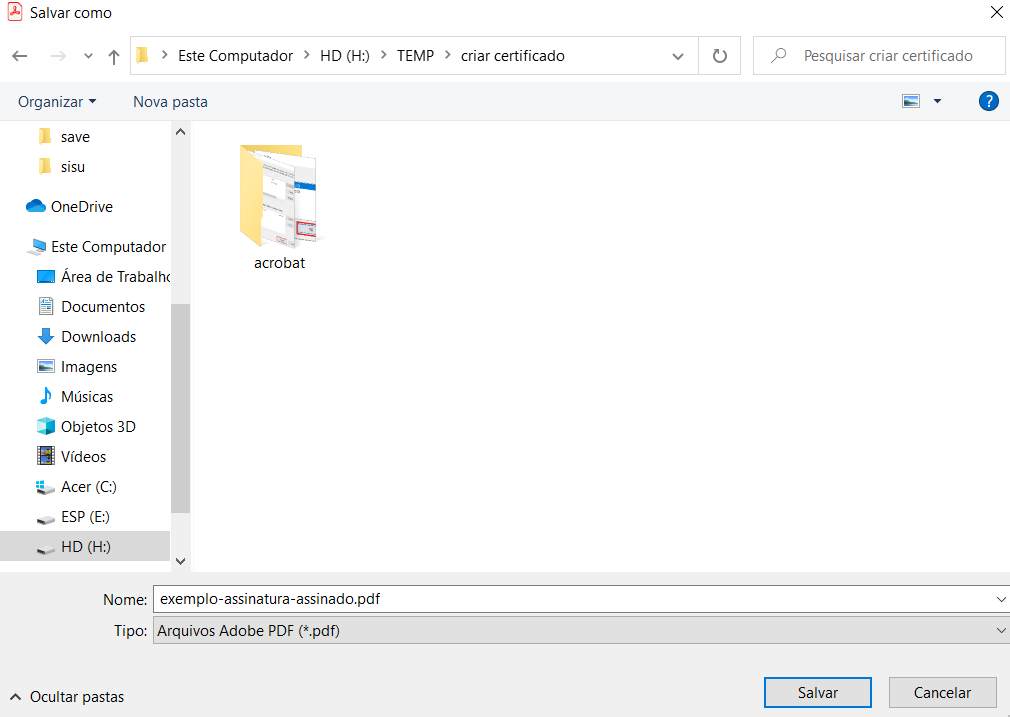
<span style="font-family: Roboto, sans-serif; color: #222222; background-color: transparent; font-weight: 400; font-style: normal; font-variant: normal; text-decoration: none; vertical-align: baseline; white-space: pre-wrap;">h) Salve o arquivo assinado</span>

![image-1624632358686.png](https://lh7-rt.googleusercontent.com/docsz/AD_4nXetmDjzdRx1ajI-0pkU3AooJ-_SuJAPnM9fIEigeWzBBZ1z4Dl_KmCaK4Dx95JTYFzsoP_gbkm-GMZztFlef2N3zzcN9GvcIRS7aQHOQbuCN1lAgCRVh0_N5XorXuWKJ94aGcmsLuPY4hv-2Mnf24c_BwY?key=LYI8w5RrNytoasnX21-Wuov1)